Sabtu, 30 Juli 2011

Choose the perfect keyword for your site

These process you can choose the perfect keyword for your site/blog.

Step 1: Go https://adwords.google.com/keywordtool

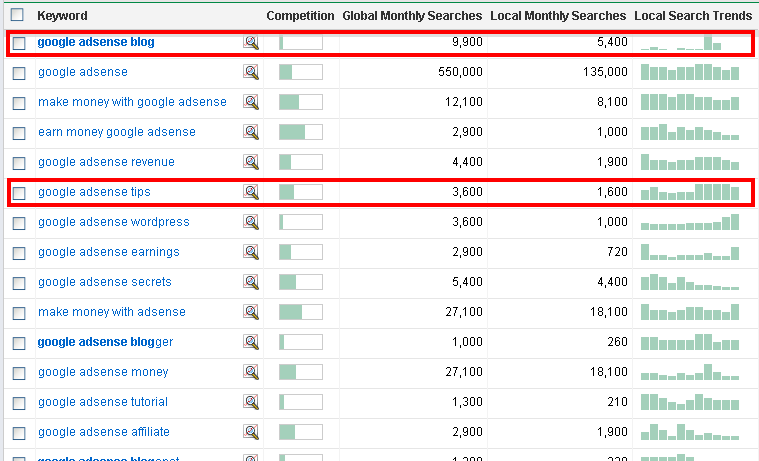
Step 2: Put any keyword that matched perfectly with your Niche like the bellow picture.


Find+Keywords

Step 3: Click on "Search". Select the keyword that has 3,000 to 10,000 monthly search in both Global and Local. Now look carefully which has low competition with high search rate.

Search+Keywords+By+AdWords

Step 4: Now go Google Search and put your selected keyword as like as this format "Your Keyword". Do this for every keywords and see total number of competitor on that keyword.

Check+Competitor+Amount

Step 5: Select lowest competitor keyword as your keyword.

I hope if you do this process, you will get more strong keyword and you can see your page in top 10 easily in every search engine. Best of luck. If you face any problem, please make comment.

Next Generation User Interface in Blogger

Blogger says in their official blog:

The new design is not only cleaner and more modern, but it also uses Google Web Toolkit, delivering the latest in web technology.
To be the greatest blogging platform, blogger introduced many new feature in 2010 like Static Pages, Blog Stats Widgets, Template Designer. And now, they doing the same thing in 2011. Take a look few photos of new interface.

Current Post Editor
Current Post Editor

New+Post+Editor
New Post Editor

Current+Dashboard
Current Dashboard

New+Dashboard
New Dashboard

New+Theme

236 Blogs for free Backlinks

Ringkasan ini tidak tersedia. Harap klik di sini untuk melihat postingan.

Free Premium Blogger Template - Completely Customized

Just take a look the demo of the template by clicking demo immediately below the screen shot of the template.


Gadget+Fan+Template
Demo | Download

Take a look it's feature:

2 Column, 1 Sidebar, 4 Column footer, Artworks, Featured Section, Fixed width, Magazine, Right Sidebar, Top Navigation Bar, Violet, Web 2.0, White


Template Customization:

Search Engine Optimization
Search this two lines by clicking F3.
<meta content='DESCRIPTION HERE' name='description'/>
<meta content='KEYWORDS HERE' name='keywords'/>
Now, Replace "DESCRIPTION HERE" with your own blog description and "KEYWORDS HERE" with your own blog keywords. (see more how to add meta tag to blogger blog)

Changing the Blogger Title Tag
No need to change. I add this tag for you.

Inseart Favicon
Search this line by clicking F3.
<link href='YOUR-FAVICON-URL' rel='shortcut icon' type='image/vnd.microsoft.icon'/>
Now, replace "YOUR-FAVICON-URL" with your own blog favicon url.

Blog Subscription
Search the following lines one by one by clicking F3.
<a href='YOUR-TWITTER-LINK'>Follow me</a>
<a href='YOUR-RSS-LINK'>Posts RSS</a>
<a href='YOUR-FACEBOOK-LINK'>Facebook</a>
Now, replace "YOUR-TWITTER-LINK", "YOUR-RSS-LINK" and "YOUR-FACEBOOK-LINK" to your twitter, rss and facebook profile or page url.

Wordpress Like Comments Section
Take a look it's comment section. It has got an excellent comments section similar to Wordpress.

comment+section

I mentioned the main features of this template. This template includes several other features and customization options as well. They are to be understood rather easily. In general, the model seems like a Wordpress theme. I hope you enjoy this Template.

Earn $10 per day with AdSense

You can earn $10 or higher per day in your blog by adsense ads publishing. For this you have to follow a tricks.

Required:


If you have the above requirement then you are ready for earn $10×30=$300 or more. Do the following steps.

Steps To Do:
  • Go http://www.ezinearticles.com (PR 6)
  • Write articles that are perfect for your blog niche
  • Post everyday 5 articles and give your link
  • Then you will get 100 or more visitors in your site
  • Place 336×280 large rectangle ads where your article start and also place in your 160×600 wide skyscraper format ads in top left or top right side
  • If you have good article you will get more than 10 click
  • If you didn't get enough visitor keep posting your article
  • It also help you for SEO

New WP Theme For Blogger - Customized Templates

Name of the template is Serge. The released date of this template is March 31, 2011. So, it's a new template. This template is designed by Lasantha Bandara. I Customized this template only for you.

Now, take a look of the template. If you wants to see the demo just click on Demo bellow the image.


Serge+Premium+Blogger+Template
Demo | Download

Take a look it's feature:
2 Column, 3 Column footer, 1 Sidebar, Adapted from Wordpress, Featured Section, Fixed width, Header Banner, Right Sidebar, Slider, Top Navigation Bar, White, Grey

How to install a Blogger template:
Just follow this link - How To Install/Upload a Blogger Template

Template Customization:
Meta Tags
Search the following two code lines and replace the read portion with your blog Description and Keywords
<meta content='DESCRIPTION HERE' name='description'/>
<meta content='KEYWORDS HERE' name='keywords'/>

Changing the Blogger Title Tag
No need to change. I added this tag for you.

Change your Favicon Icon
Search the following code and replace read portion of the code with your favicon url
<link href='YOUR-FAVICON-URL' rel='shortcut icon' type='image/vnd.microsoft.icon'/>

Top Navigation Bar
Just Search the following code line
<a expr:href='data:blog.homepageUrl'>Home</a></li>

The above code line indicate the home page. Just below the above code line you will find
<li><a href='#'>Business</a>

Now change # to Your Label or Page URL and Business with your menu title. Fow each menu you have to do the same. If you wants to add extra Children menu within each menu you have to add extra code just like the following
<li><a href='#'>Business</a>
<ul class='children'>
<li><a href='#'>Internet</a></li>
<li><a href='#'>Market</a></li>
<li><a href='#'>Stock</a></li>
</ul>
</li>

Slide Show Menu
To edit slide show menu search the following line
<h3>This is featured post 1 title</h3>
Replace this line with your post title. After the above line you will find description section. Replace this portion with few lines of your post. Replace read portion of the following code with your post url
<a class='open' href='SLIDER-1-URL-HERE' title='This is featured post 1'/>
Replace the red url portion with your post image url
<img alt='' class='full' src='https://blogger.googleusercontent.com/img/b/R29vZ2xl/AVvXsEgkeh5rF4WS1Lyzhp6fvm3TJWG71NlxXs9k5fOPYwDBFWgZpYIkfMkiUNDpHD1bUBULKNA3PIkI_7Z60kWC327YNu7ms358PhWKAR-EbBbuUkc-xnf74K5po4_X6QEK0468wWjIk6LYEEaK/s1600/1.jpg'/>

Do this for your five recent posts. These five posts will show accordingly by slide show.

Blog Subscription
Replace Username with your twitter username.
<a href='http://twitter.com/USERNAME'>

I mentioned only the main features of this template. This template includes several other features and customization options as well. They are to be understood rather easily. In general, the model seems like a Wordpress theme. I hope you enjoy this Template.

20 Reasons for Getting Banned in Google AdSense

Some people say they did not act anything illegal with Adsense but their Adsense account get band by Adsense. Check this maybe you will find your reason or reasons.
  • 1st Ignoring the AdSense policies and Terms and Conditions
  • 2nd Clicking on own ads, click especially those who are "really interested to ask" to the people on ads: friends, family members, their families, visitors or their dogs or cats. Use proxies to be discovered.
  • 3rd Participating in a kind of click-ring. Click on the rings are groups of people meet with the consensus to click on the ads of others. The most commonly used methods, the Yahoo groups, instant messaging are, mailing lists, web forums, or specially written software.
  • 4th Using the software, click-bot. Click-Bot software is your website and click on your ads convert. Most of the time these robots through proxy servers to avoid detection.
  • 5th Clickers pay. These are people whose main jobs are clicking on PPC ads and malicious paid by publishers. Most of them are developing countries like India or China.
  • 6th "Promises to offer investment" for Web sites' AdSense clicks to your website. No matter which method they use is likely to fall under one of the above.
  • 7th additional words to your visitors, your ads. Type "Click" or "Please Help" or "Please visit our sponsors." What is not approved by Google "sponsored links" or "advertising".
  • 8th Put as many ads as possible on each side. Put more than three units of the standard display unit, more than one unit of ad links, or more than one referral buttons for any AdSense, AdWords, and Firefox, all on one page.
  • 9th Spyware use to get traffic to your website. Spyware, adware, malware, or whatever his name force computer users to your website every time you open start your computer. Or better yet, use a type of software written specifically to display toolbar etc., or click on their ads.
  • 10th Use the pop-ups on your site. Each time the user opens a page, another pop-up, perhaps with a smile, or advertisements IQ test.
  • 11th Get the most traffic-Target not possible to rotate, for example, through the auto-surf program to the members about your site and other sites.
  • 12th Put the AdSense code on pages with no content: Application forms and conditions page.
  • 13th Once a competitor contextual ads on the same page with AdSense ads, such as Yahoo Publisher Network. Note, however, that non-targeted ads, such as affiliate links or ads for keywords are acceptable and banned from Google.
  • 14th Get more than one AdSense account. Maybe one for your dog in situ, one for your cat in situ, download a v1agra pills, mp3, etc.
  • 15th Put your AdSense code in e-mail, Usenet, RSS, etc.
  • 16th each, what percentage of clicks, page impressions, etc. Tell people of your total income, unfortunately, is authorized to Tell.
  • 17th Use the Google logo, which should not, and do not put the logo where it should be. In other words, ignore the Google brand.
  • 18th Change the AdSense code as you see fit. Change will do the design, color, direction. Only a little more copy and paste the Google code.
  • 19th And this is important: If the Google AdSense team sent by e-mail, please ignore it.
  • 20th Put the AdSense code on pages with content prohibited.