Sabtu, 30 Juli 2011

RSS Directories List

Here is a list of RSS directories. Submit your feed in these high PR directories for better result.

  • www.blogdigger.com
  • www.blogpulse.com
  • www.feedage.com
  • www.2rss.com
  • www.blogstreet.com/bsibin/add.cgi
  • www.publisher.yahoo.com/rss_guide/submit.php
  • www.plazoo.com/en/addrss.asp
  • www.feedbite.com
  • www.rssfeeds.com
  • www.feedraider.com
  • www.feedsubmitter.com
  • www.purerss.com/addfeed.php?catid
  • www.unclefeed.com/rss/addfeed.htm
  • www.feedsee.com/submit.html
  • www.feed24.com/?c=add
  • www.feedfury.com
  • www.goldenfeed.com/AddFeed.aspx
  • www.feedooyoo.com/ref.htm
  • www.feedest.com/feedAdd.cfm
  • www.rssmad.com
  • www.feedbase.net/Add.php
  • www.rssmicro.com/?m=fs#theForm
  • www.rssmotron.com/feed_eater.php
  • www.feedster.com/index.php
  • www.syndic8.com
  • www.newsisfree.com
  • www.blogdigger.com
  • www.blogbridge.com
  • www.feedsfarm.com
  • www.feeds4all.com
  • www.2rss.com
  • www.feeds2read.net
  • www.rss-network.com
  • www.rssfeeds.com
  • www.feedminer.com
  • www.rsshut.com
  • www.rsspect.com
  • www.feed24.com
  • www.feedsee.com
  • www.search4rss.com
  • www.rss-locator.com
  • www.everyfeed.com
  • www.pheeds.com

RSS Directories is so important. So, submit your rss quickly.

Create AdSense Account With Weebly (Quick Approved)

It is my another post for quick approving in Google Adsense. If you wants to see previous one, click in the following links.


Get Adsense Account within 24 hrs

Now I am going to discuss about adsense account by weebly. Follow the following steps-

Step 1: SignIn your account in http://www.weebly.com

Weebly+Site+For+AdSense+Account

Step 2: Create a blog with al least 10 post. Create a Privacy Policy page.

Check out the following link for example-

http://abc-24.weebly.com

Step 3: Digg your all post url for quick index. After indexed go for next step. It will take maximum 2 days.

Step 4: Now, click on "Check out Google Adsense".

Step 5: You will see the following page, fill the requirement and press ACCEPT.

Step1+For+AdSense+Account

Step 6: Then you will see the confirmation message press finish.

Step2+For+AdSense+Account

Step7: Check your "ACCOUNT" (in weebly), you will see a publisher id.

Publisher+Id+Checking+In+Weebly+Site

Step 8: Now, check your mail. They will sent you a mail. Fill the requirement and send it to adsense.

Step 9: Wait at least a week.

Get Google AdSense Account Within 24 hrs

Now-a-days, it is very difficult to create a Google Adsense account. But you can create a adsense account within 24 hrs, where direct application need 2-3 day. It is too easy.

Step 1:
First sign up the following link
http://www.indyarocks.com/register_step1.php

Step 2:
Upload minimum 10 photos and your profile pic (original)
Complete your profile (minimum 50%)

Step 3:
Visit this link http://www.indyarocks.com/adsense/adsense_index.php


Create+Google+AdSense+Account

How to boost a site backlink

If you make comment like, "thanks", "nice post, thanks for share" ..... that looks like spam. These types of comments are valueless. Web master deny these types of comments.

See my opinion about backlinks:
1. To boost your backlinks, join at least 3 forums that appropriate to your keywords. You have to choose the forums that has very high page rank and that has option to put signatures. Put your blog/site url with your anchor text as a signature. Try to post at least 5 post and 5 comments every day. If you do these, you will get 3*(5+5)=30 backlinks every day that means 30*30=900 backlinks in every month. It will take maximum one hour in a day. So, do this to boost your backlinks.

2. Try to make comments in high ranked blogs. Put your keyword in your name option then put your url and email address. That's it!! By this process your keyword get better position.

3. Search different website that give backlink for Sign Up. Sign Up, and put your url in your profile. This type of backlinks are really strong. Try to do these, as much as possible.

4. Discuss with other blogger and web master for link exchange. If they have better rank, give them more advantage. It's not a matter if you give them more priority. If you need to pay for high page rank backlinks, do it.

There is many other ways but i think above is enough if you do these regularly. So, to see your site in better position on search engine follow these.

Adding meta tags in your blogger blog

How To Add Meta Tags To Blogger Blog
Meta tags are the codes of a webpage that are used to provide the data to search engines. These tags are not important for website ranking but it help to get more traffic form search engines like Google, Yahoo, Bing, Ask etc. These code tells the search engines about your site/blog. Meta tags are help to index your pages more quickly and accurately. That means the meta tag of a website/blog communicate with the search engines to provide more infomation about your website/blog. See the following steps for adding meta tags in your blogger blog.


Step 1: SignIn your Blogger account and from the Dashboard of your account go "Design"

How To Add Meta Tags To Blogger Blog

Step 2: Then Click "Edit HTML"

How To Add Meta Tags To Blogger Blog

Step 3: Now backup your template by clicking "Download Full Template"

How To Add Meta Tags To Blogger Blog

Step 4: By clicking F3 search the following code
<b:include data='blog' name='all-head-content'/>
Step 5: Paste the following codes just below the above code
<meta content='Blog Title Here' name='title'/>
<meta content='Description' name='description'/>
<meta content='Keywords Here' name='keywords'/>
<meta content='Blog Languare' name='language'/>
<meta content='15 days' name='revisit-after'/>
<meta content='Blog Author Name' name='author'/>
<meta content='Blog Owner Name' name='owner'/>
<meta content='INDEX,FOLLOW' name='robots'/>
<meta content='(c) 2010' name='copyright'/>

Check the following picture for more help.

How To Add Meta Tags To Blogger Blog

Change the red portion of the above codes with your blog information.

Step 6: Save your changes.

That's it. Now go Meta Tag Analyzer for checking your blog meta tags. I hope you will like this.


Best Blogger Tips

How to get backlink from any high pagerank blog

Commenting on high PR blogs can get you some real backlink juice if done correctly.
Some spam comments like the following:

“thanks a lot for your valuable sharing, right from the beginning till end it was really very informative”
“I cannot agree on everything you say in this article, but perhaps I missed some of the points you were trying to make…”
By the way this last comment if searched in google with quotes will return 1180 results. These kind of comments they may pass the moderation but google is starting to crack on them because they are just all over the place and you may not get any credit for it.

This is the reason I choose to share my methods on commenting on any blog any subject like an expert on whatever conversation. and Google or any search engine will find my comment more relevant than even some non-spammers comments.

1. Go to the blog you are interested in commenting on
There is a lot of lists shared here in this wonderful forum
2. Copy the content of the post
3. Go to http://textalyser.net and paste it in the box and hit “Analyze the text”
4. You will get the most (used) relevant keywords in that post.

Copy some of the keywords and do [control+F] to find those keywords in the post, and scan to find a sentence that includes 2 0r 3 of them. Then rewrite that sentence, maybe combine it with another sentence, then add a little twist to it and you are good to go.

I used this method with great success and made comments in a lot of blogs and forums even in subjects that I have no knowledge in. and always got good results.

Source: http://publisher-tricks.us/white-hat-seo/how-to-get-backlinks-high-pr-blog

Free Targeted Traffic from Digg Within an Hour

Digg is a popular social bookmarking website. Its cornerstone function consisted of letting people vote stories up or down, called digging and burying, respectively. Digg's former popularity prompted the creation of other social networking sites with story submission and voting systems.

Digg+Logo

You can get targeted traffic by using digg. Suppose you have a blog post, that you want to promote. Now, you have to do following instructions.

1. Do your research on the post and found two long keyword that has highly value in search engine.
2. Now, go to the digg and submit your post. Put one keyword in title and other in description.
3. That's It. Wait and see the magic.

An hour later, search your keyword and i hope you will see your website/blog in the first page in any search engine. If your keyword is competitive, then check second or third page.

How to make 100% unique content

If you are a regular blogger, you must face unique content problem. It is very difficult to write everything from your mind or experience. But you know success of a blog will depend on unique contents. Content is king. It also help you to get better ranking. So, what we can do now?? Is here any tricks to made it?? It is like a million dolar question. Answer is, Yes! i have a tricks to made 100% unique content and it will pass copyscape. I find it from other site. You can do this. To do this follow the instructions.

Step 1: Find out some high quality article with your keywords.

Step 2: Copy the articles and paste it in MS Word. Cut unwanted part of the article.

Step 3: Go Google Translator.


Step 4: Select English to Spanish language and then paste your article on it. Then Spanish to English.

Step 5: Now, English to French language.

Step 6: French to German.

Step 7: At last German to English.

Check the output article with original article. You will find huge change from the previous one. Now paste it in your blog. Copy the post url and put it on http://www.copyscape.com for unique content checking. You will not find the original site on that list (85% sure).

150 Do-follow blog list

If you wants to built more and more powerful backlinks you should find more and more do-follow site/blog. Here is 150 do follow blog by which you can get quality backlinks. Check this out.

1. http://www.affordable-internet-marketing.com
2. http://pixelheadonline.com/blog
3. http://laughoutlouddogs.com
4. http://www.memwg.com
5. http://fatladysingz.com
6. http://www.jakeldaily.com
7. http://www.scribblesnscraps.com
8. http://tallfreak.com
9. http://weblogtoolscollection.com
10. http://www.lifeintherough.com
11. http://www.suzannesaysblog.com
12. http://www.lifeinthefastlane.ca
13. http://www.layercake.net
14. http://www.stevenaitchison.co.uk
15. http://spendingabillion.com
16. http://almerimarlife.com
17. http://www.tvhe.co.nz
18. http://altitis.treehuggers.info
19. http://bethanyactually.com
20. http://blog.epicedits.com
21. http://dorannes.com
22. http://jasonpenney.net
23. http://blog.greens.org.nz
24. http://dougal.gunters.org/blog
25. http://www.learningcurvecoaching.com
26. http://www.pureblogging.com
27. http://www.alistseo.com
28. http://www.blackwaterblog.com
29. http://www.blueverse.com
30. http://www.bookmarkbliss.com
31. http://www.sueblimely.com
32. http://www.sueblimely.com
33. http://abstract2collective.blogspot.com
34. http://www.keralaroom.com
35. http://www.lighteningsblogworld.com
36. http://www.catswhocode.com/blog
37. http://imbloggingthat.com
38. http://slyvisions.com
39. http://qualitynetdesign.com
40. http://www.phil801.com/wpblog
41. http://www.newhomessection.com/blog
42. http://middlezonemusings.com
43. http://www.netevolution.co.uk/blog
44. http://www.melissamularski.com
45. http://www.webtrafficroi.com
46. http://www.finecoastalliving.com/blog
47. http://www.kilheeny.com
48. http://countrykitchenpantry.com
49. http://adryblog.net
50. http://www.bigfootwebmarketing.com
51. http://vmasti.com
52. http://redstaplerchronicles.com
53. http://tekkim.info
54. http://www.internetmarketeen.com
55. http://ineeddiscipline.com
56. http://blog.monkeyprofit.com/2009/06…ps-and-tricks
57. http://www.creditscoreinsight.com
58. http://heiseidemocracy.com
59. http://www.wordpressmax.com
60. http://www.markwilson.co.uk/blog
61. http://afterlight.110mb.com
62. http://newsletter.blizzardinternet.com
63. http://www.simplerandomness.com
64. http://ericsocia.net
65. http://www.seopedia.org
66. http://www.lcdlove.com
67. http://jakeldaily.com
68. http://tallfreak.com
69. http://chrishoyt.com
70. http://www.brilliantcheers.co.uk
71. http://www.bestrealincome.com
72. http://crayonwriter.com
73. http://advertising-for-success.blogspot.com
74. http://www.bodyfitnessinfo.com/blog
75. http://lillieammann.com
76. http://www.zr5.net
77. http://www.ecommtips.com
78. http://www.communityspark.com
79. http://www.lifeinthefastlane.ca
80. http://www.lifeinthefastlane.ca
81. http://www.simplekindoflife.com
82. http://selfhypnosisprogram.com
83. http://www.brazencareerist.com/2009/…areer#comments
84. http://www.indiancashmaker.in
85. http://lastblogger.com
86. http://www.blackwaterblog.com
87. http://gotraveller.blogspot.com
88. http://www.1st-kohsamui.com/blog
89. http://www.apmid.org
90. http://www.my-image-host.com/blog
91. http://asseenonthetube.com
92. http://myecoaction.com
93. http://getadviced.com
94. http://www.engadgeteer.com
95. http://atxgraffiti.com
96. http://pokerbankrollblog.com
97. http://greenstoreandmore.com
98. http://www.notguru.com
99. http://www.nj-realestate-agent.com
100. http://www.leecolbran.co.uk
101. http://handanalysisonline.com
102. http://theblogabouteverything.com
103. http://www.extracashsystems.com
104. http://www.untwistedvortex.com
105. http://screwyougoogle.com
106. http://retirerichroadmap.com
107. http://www.affiliatefunnelsecrets.com
108. http://www.toysandgameschatter.co.u
109. http://www.jackhumphrey.com
110. http://small-biz-ideas.net/blog
111. http://jackzufelt.com
112. http://www.zaldydalisay.com
113. http://www.imnicheformulasecrets.com
114. http://www.timgary.com
115. http://technewsline.net
116. http://www.effortlesshr.com/blog
117. http://stevediamondconsulting.com
118. http://www.spiritualpreneurs.com
119. http://www.kiwibloke.org
120. http://www.nerdydork.com
121. http://www.rc-cars-hobby.com
122. http://technewsline.net
123. http://findportablesolarpower.com/savemoney
124. http://www.wordcat.co.uk
125. http://xatal.com
126. http://iwannabuyacamera.com
127. http://www.smallwebsitehost.com
128. http://www.nj-realestate-agent.com
129. http://limeshot.com
130. http://tycoonblogger.com
131. http://www.extracashsystems.com
132. http://theblogabouteverything.com
133. http://www.growmap.com
134. http://tycoonblogger.com
135. http://tomglenn.co.uk
136. http://www.imnicheformulasecrets.com
137. http://tampafloridarealestateblog.com
138. http://www.theviralsanctuary.com
139. http://tucsonseosolutions.com
140. http://lemonarian.com
141. http://userworthy.com
142. http://randomproxy.co.uk/blog
143. http://dailyscrewups.com
144. http://www.blog.freeiphone4me.co.uk
145. http://nobogies.com
146. http://lissowerbutts.com
147. http://www.thalesdotcom.com
148. http://i-trepreneur.com
149. http://retirerichroadmap.com/blog
150. http://va4growth.com/blog

How to make A Blogger Do-follow

Backlinks are very important for a website or blog. It like votes for your website. Huge backlinks means high page rank and high traffic. You can get backlinks in different ways. One of the most favourite ways is commenting on other sites. But condition is you have to comment on dofollow blogs. Unfortunately all blogger blog are nofollow by default. So you have to make them dofollow to provide the opertunity of others to get backlinks form your site.


Make+Blogger+Blog+Dofollow

Nofollow is a HTML tag added to the link anchor code, and will change the normal code as:

<a href=”yoursiteurl” rel=”nofollow”>anchor text</a>


How to make a blogger blog dofollow

Follow the following instruction to make a dofollow blog

1. Firstly you have to allow "Anyone - includes Anonymous Users" comments. To do this go "Settings>Comment" .

Make+Blogger+Blog+Dofollow+Step1

Then enable "Anyone - includes Anonymous Users" like the following picture.

Make+Blogger+Blog+Dofollow+Step2

2. Now, go "Design>Edit HTML" and click "Expand Widget Templates"

Make+Blogger+Blog+Dofollow+Step3

3. Then by pressing F3 search the following two lines

<a expr:href='data:comment.authorUrl' rel='nofollow'>
<a expr:href='data:backlink.url' rel='nofollow'>

4. Remove rel='nofollow' portion from the above codes

5. Now save your changes

Do-follow Social Bookmarking Site List

Ringkasan ini tidak tersedia. Harap klik di sini untuk melihat postingan.

Huge List of High Pagerank Do-follow Blog

Here is a list of hugh high pr dofollow sites for you to improve your blogs or websites backlinks, pagerank and reputation online.


Dofollow+blog+List

You also can make you blog dofollow. Follow the following link to make your blogger blog dofollow.

How to make a blogger blog dofollow

I love dofollow links. I think most of the webmasters and bloggers like these. Collect high pr dofollow links as much as possible from the following list and try to make strong backlinks for your blog or website.

Dofollow Social bookmarking Site List
http://streamoney.blogspot.com/2011/07/do-follow-social-bookmarking-site-list.html

The Ultimate Do Follow Blog List with High Pagerank
http://niceblogger.com/2009/08/21/dofollow-list

High PR Dofollow Blogs List Including .EDU Sites
http://dofollow.info/blog/high-pagerank-pr-dofollow-blog-list-edu

List of High PR DO FOLLOW Blogs
http://adsenseurdu.com/blogging/list-of-hgh-pr-do-follow-blogs

High PR 6 Dofollow Blog List
http://atniz.com/2009/07/05/high-pr-6-dofollow-blog-list

162 HIGH PR Auto Approval DoFollow Blogs List
http://publisher-tricks.us/white-hat-seo/162-high-pr-auto-approval-dofollow-blogs-list

DoFollow Blogs List With High PR Part 1
http://www.hostingdiscussion.com/website-development-design/21545-dofollow-blogs-list-high-page-ranking-part-1-a.html

Page Rank 6 Free Classified Ads Website
http://sadiakomal.com/dofollowblogs

High Page Rank Free Do-Follow Forums and Blogs
http://www.techtipsmaster.com/do-follow-forums-and-blogs.html

High Pr Do Follows Blog List
http://www.way2wp.com/high-pr-do-follows-blog-list-322

Building Traffic Channel with Social Networks

The social networking sites are sweeping the latest Internet. Although it is used for the table forum, and they are always very popular, has social networking is another way in which people come together. As an Internet marketer, it is important to recognize that people are using these pages 13-80, and they spend much time after their arrival. It is natural that any kind of marketing is good for something, want to get your message through such sites.

Social networking is so popular, bringing together trade and people, according to their interest. This means that if you have a product that is the way to save his collection of baseball cards, only to find, gather people around baseball cards. Its product would more than likely can be absorbed well and generate interest in your product quickly. The people from these social networking sites and would be interested in your type of product that leads to an increase in total sales.

Most social networks, create a profile, that what your interests are shown. These profiles are available, so you can easily search through the baseball cards "and get a whole bunch of people who are fans of baseball cards. Then only a matter of getting to know them, expect to identify your product and that Sales in the first. You can visit a baseball card in bulk and give them a message to visit Business Link. Because these people have a strong interest in the niche, it is very likely that to investigate your site.

Meta tags are another way that the label set of social networking sites available. Therefore, just search on the topic together niche for the list. The following is for people interested in what it has to offer are, marketing, and it will increase visitors to the site. You do not have a list on the market to provide for them. If your product or service is of good quality, of course people will be impressed and willing to try.

Marketing via social networking sites is not easy, but easy. Convert website traffic is much more than advertising in general, because you have their products to a specific group of people. If you are good products that can deliver on the amount, it is easy to convert visitors into sales.

Why is content focus a better strategy for SEO than link building?

When it comes to success in SEO and online marketing, a factor that is now gradually growing in importance is the content that you have on your website. Content has always been an important aspect of SEO, but is now more relevant than ever, as Google is placing more and more importance on content as a way of determining where a site should rank.


Why Is Content Focus A Better Strategy For SEO Than Link Building?

Having well written and keyword friendly content is important. Also important is the fact that the content shouldn’t be spammy, as this can have a detrimental effect when it comes to rankings. Building a strategy around content seems to be a bit farfetched, but with the benefits of well thought out content becoming more apparent, it’s an excellent strategy to utilize for your SEO campaign.

Think about your site, and the industry you’re in, and how content could be used to your benefit. A lot of sites will now have a blog as well, and this is an excellent way to keep content on your site fresh, and to keep Google coming back to visit your site. If you’re in an industry that doesn’t change much in terms of products or services, then a blog is an excellent way to keep your site updated. It can also help to educate visitors to your site. If you’re working in a small or niche industry, your blog can become a valuable source of information, which will be looked favourably on by Google.

If you’re an SEO business, it can sometimes be difficult to demonstrate to the client the benefit of content as opposed to linking, as linking will be one of the things that clients have heard about when it comes to SEO.

Think outside the box a little. Help your client see the benefit of content, and how it can do more for their site than link building. While blogs are a brilliant addition to any site, there are other options as well. Do people come to your site looking for an answer on how to do something? Then consider incorporating how-to guides or tutorials to your site. These can be more interactive than your standard FAQ, and if people start linking back to these pages, then this also helps to build authority for your site. Offering content about your industry, a focus on the history of something, or even guides to current trends, these are all pages that people will see as valuable.

Ultimately, clients want their site to be found, and if you can demonstrate to them the worth of content as opposed to link building, content can be a way to stand out amongst their competitors.
Author: Angela is proud to be an essential part of a seo company and likes the potential that SEO can bring to businesses, and enjoys writing articles that answers questions and discusses possibilities.


Best Blogger Tips

Index a site in every search engine

For search engine index and better page rank you need hard word. All popular search engine index your site by two process. These are-

1. Submitting page url: You can submit your page in google, yahoo, bing, ask and all other possible search engines etc.
2. By back link: It is very important for a site. 50% of success of your site or blog depend on this. Back link is to post your link on other site. Search engine index a site every 10-20 minutes if they have 300+ online visitor. So, you need to choice a site where, you will get more than 300 online visitor. For example, Facebook, twitter, different high page ranked forum, different article posting site, yahoo answer etc.

Few high page ranked forum are given for your help:
  • http://www.chronicle.com/forums (rank 8)
  • http://www.forums.techcrunch.com (rank 8)
  • http://www.gamespot.com/forums/index.html (rank 8)
  • http://www.forum.joomla.org (rank 8)
  • http://www.mathforum.org (rank 8)
  • http://forum.grasscity.com (rank 5)
Note: don't post your link everywhere, don't disturb other visitors, after making a good comment then post your link.

SEO tips that can help a site generate traffic

If you have desire to start new online business then first you need promise one thing. Does not matter how big your business idea is ? you will not succeed if people do not know about your business. In this article you ‘ll get some SEO tips which is the first step to promote your website.


SEO Strategy Tips That Can Help Your Website Generate Traffic

The most impotent recent updates seo Strategy which is updated by Google and panda farmer that ‘ll very powerful blow for many online business owner.

A great deal that the SEO marketing has changed. The change to the SERP was called for, since the amount of sites providing poor content and false advertisement was through the roof. The first SEO tips is quality content you should follow in order to improve traffic and increase your page ranking. If the articles are poorly written and useless, you should remove them as soon as possible. Although it will be slow and pricey, Google SEO strategy is required if you hope to regain your place in the search engine result page.

One of the other SEO strategy is to keep an eye out for the newest updates and changes to the search engine all the time. The success of website SEO marketing depends on your knowledge skills to use everything that the creators of Google come up with in your advantage.

The newest SEO strategy tips worth mentioning is to become a socially active presence in social networks such as Facebook, Linkedin or Twitter. The last piece of advice regarding website SEO marketing, make sure that your website does not have back-links to sites with a bad reputation. To generate website traffic by this way you must Hire SEO Expert.

Best Blogger Tips

Choose the perfect keyword for your site

These process you can choose the perfect keyword for your site/blog.

Step 1: Go https://adwords.google.com/keywordtool

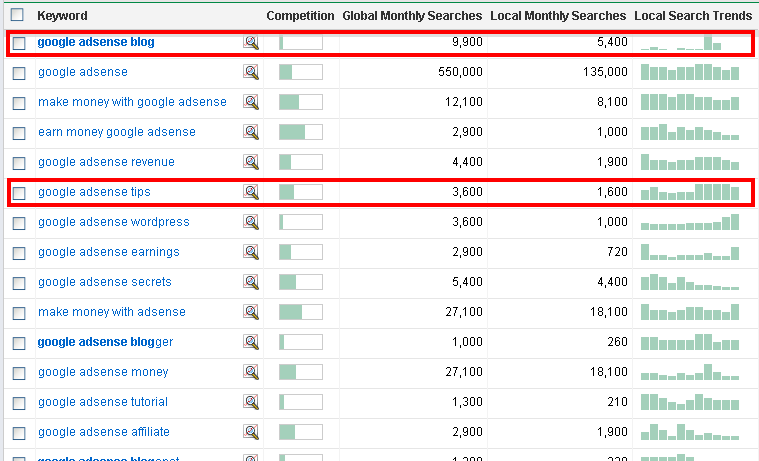
Step 2: Put any keyword that matched perfectly with your Niche like the bellow picture.


Find+Keywords

Step 3: Click on "Search". Select the keyword that has 3,000 to 10,000 monthly search in both Global and Local. Now look carefully which has low competition with high search rate.

Search+Keywords+By+AdWords

Step 4: Now go Google Search and put your selected keyword as like as this format "Your Keyword". Do this for every keywords and see total number of competitor on that keyword.

Check+Competitor+Amount

Step 5: Select lowest competitor keyword as your keyword.

I hope if you do this process, you will get more strong keyword and you can see your page in top 10 easily in every search engine. Best of luck. If you face any problem, please make comment.

Next Generation User Interface in Blogger

Blogger says in their official blog:

The new design is not only cleaner and more modern, but it also uses Google Web Toolkit, delivering the latest in web technology.
To be the greatest blogging platform, blogger introduced many new feature in 2010 like Static Pages, Blog Stats Widgets, Template Designer. And now, they doing the same thing in 2011. Take a look few photos of new interface.

Current Post Editor
Current Post Editor

New+Post+Editor
New Post Editor

Current+Dashboard
Current Dashboard

New+Dashboard
New Dashboard

New+Theme

236 Blogs for free Backlinks

Ringkasan ini tidak tersedia. Harap klik di sini untuk melihat postingan.

Free Premium Blogger Template - Completely Customized

Just take a look the demo of the template by clicking demo immediately below the screen shot of the template.


Gadget+Fan+Template
Demo | Download

Take a look it's feature:

2 Column, 1 Sidebar, 4 Column footer, Artworks, Featured Section, Fixed width, Magazine, Right Sidebar, Top Navigation Bar, Violet, Web 2.0, White


Template Customization:

Search Engine Optimization
Search this two lines by clicking F3.
<meta content='DESCRIPTION HERE' name='description'/>
<meta content='KEYWORDS HERE' name='keywords'/>
Now, Replace "DESCRIPTION HERE" with your own blog description and "KEYWORDS HERE" with your own blog keywords. (see more how to add meta tag to blogger blog)

Changing the Blogger Title Tag
No need to change. I add this tag for you.

Inseart Favicon
Search this line by clicking F3.
<link href='YOUR-FAVICON-URL' rel='shortcut icon' type='image/vnd.microsoft.icon'/>
Now, replace "YOUR-FAVICON-URL" with your own blog favicon url.

Blog Subscription
Search the following lines one by one by clicking F3.
<a href='YOUR-TWITTER-LINK'>Follow me</a>
<a href='YOUR-RSS-LINK'>Posts RSS</a>
<a href='YOUR-FACEBOOK-LINK'>Facebook</a>
Now, replace "YOUR-TWITTER-LINK", "YOUR-RSS-LINK" and "YOUR-FACEBOOK-LINK" to your twitter, rss and facebook profile or page url.

Wordpress Like Comments Section
Take a look it's comment section. It has got an excellent comments section similar to Wordpress.

comment+section

I mentioned the main features of this template. This template includes several other features and customization options as well. They are to be understood rather easily. In general, the model seems like a Wordpress theme. I hope you enjoy this Template.